Car Radio Repair: The Complete Guide to Diagnosing and Fixing a Dead Radio
Published: 19 Jun.2026
A silent dashboard is more than just annoying. It can mean you’re missing traffic alerts, losing Bluetooth calls, or driving without the backup camera display you rely on every day. The good news: most car radio problems trace back to a handful of common causes, and many of them cost less than a tank of gas to fix.
This guide walks you through exactly why your car radio repair stopped working, which fixes you can safely do yourself, which ones call for a professional, and how to avoid paying for a full replacement when a simple repair will do.
Why Trust This Guide
Car radio issues range from a 50-cent fuse to a $1,500 infotainment module, and the internet is full of generic advice that doesn’t tell you which one you’re dealing with. This guide breaks the problem down by symptom, gives you a real diagnostic path, and includes the things most articles skip entirely: anti-theft radio codes, capacitor failure, CAN bus communication errors, and a clear-eyed look at when repair beats replacement.
Quick Symptom Checker
Before you dig in, match what you’re experiencing to the likely cause. This alone can save you an hour of guesswork.
| Symptom | Likely Cause |
|---|---|
| Radio is completely dead, no lights, no display | Blown fuse, dead battery, bad wiring |
| Display works but no sound at all | Faulty speakers, bad amplifier, blown internal fuse |
| Sound cuts in and out | Loose wiring connection, failing ground wire |
| Static or weak reception only | Damaged or disconnected antenna |
| Radio asks for a code and won’t turn on | Anti-theft lock triggered (very common after battery work) |
| Screen frozen or unresponsive | Software glitch, needs a reset or update |
| Radio works, but other features are weird | CAN bus or wiring harness issue tied to the radio’s circuit |
Common Causes of a Car Radio Not Working
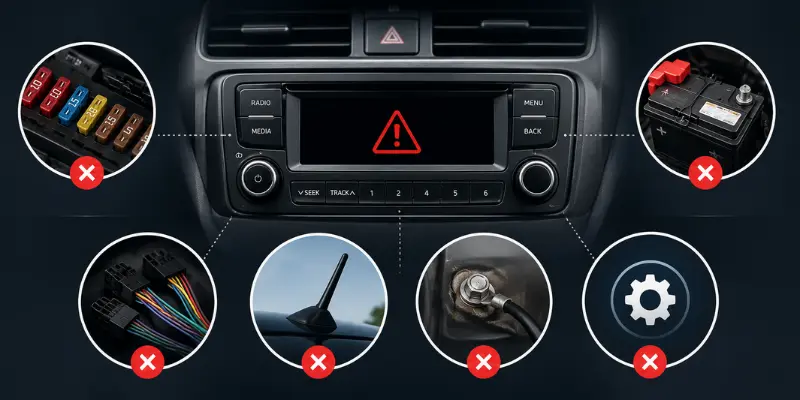
Nearly every radio failure comes down to one of these nine causes. Understanding which one applies to your car is the first step to an accurate, affordable fix.
Blown fuse
The single most common cause. A power surge or short trips the fuse, cutting electricity to the radio entirely.
Dead or weak battery
If the battery can’t supply steady voltage, the radio may flicker, reset, or refuse to power on.
Loose or corroded wiring
Connectors vibrate loose over time, and ground wires corrode, both of which interrupt the circuit.
Faulty head unit
The radio itself can fail internally, especially in vehicles over 8 to 10 years old.
Failing capacitors
Older radios use electrolytic capacitors that dry out or leak with age and heat, a known issue often called “capacitor plague.” This shows up as weak, distorted, or fading sound even though the display works fine.
Antenna problems
A broken, disconnected, or corroded antenna connection causes static or no reception, but doesn’t affect Bluetooth, CDs, or USB audio.
Outdated firmware
Modern infotainment systems run on software just like a phone. Skipped updates can cause freezing, slow response, or feature glitches.
Anti-theft lockout
Many factory radios lock themselves automatically if power is disconnected, such as during a battery replacement, and demand a security code before they’ll turn on again
CAN bus or multiplexed wiring faults
In newer vehicles, the radio often shares a communication network with the steering wheel controls, backup camera, and even airbag sensors. A fault anywhere on that network can make the radio act erratically, even if the radio itself is fine.
You May Also Like It:
Glass and Mirror Repair – A Clear Guide for Safer Driving and Better Visibility
Wheel Alignment With New Tyres – Do You Need It?
Golf Buggy Tyre Pressure – The Best PSI for a Safer, Smoother Ride
How to Diagnose Your Car Radio Step by Step
Work through these steps in order. Each one rules out a cause before you move to the next, so you don’t waste money replacing parts that were never broken.
Check the dashboard lights
Turn the key to the “on” position. If the radio display, climate controls, and dome light all stay dark, suspect the battery or a main fuse rather than the radio itself.
Locate and inspect the radio fuse
Check your owner’s manual for the fuse box diagram. A blown fuse has a visibly broken filament or a discolored window. Swap it for one of the same amperage.
Watch what happens after the fuse swap
If the new fuse blows immediately, stop. That means something downstream is drawing too much current, and replacing fuses repeatedly will not fix it. This points to a short in the wiring or a failed amplifier.
Test for a security code lock
If the screen shows “CODE” or “LOCKED” after any battery disconnection, your radio is fine. It just needs its anti-theft code, which is usually in your glovebox paperwork, the original purchase receipt, or available from the dealer with proof of ownership.
Isolate the antenna
If you get sound from Bluetooth, USB, or a CD but only static on AM/FM, the antenna or its connection is the problem, not the radio.
Listen for sound from each speaker individually
Use the radio’s balance and fader controls to isolate one speaker at a time. Silence from just one speaker points to a blown speaker or wiring issue, not the head unit.
Check for a CAN bus warning
If other electronics (steering wheel buttons, backup camera, parking sensors) act up at the same time as the radio, the issue may be on the shared communication network rather than the radio itself. This typically needs a diagnostic scan tool to confirm.
Use a multimeter if you’re comfortable with one
Set it to DC voltage and test the radio’s main power wire (usually red) and ground wire (usually black) at the connector. You should read close to 12 volts. Anywhere significantly lower points to a wiring or ground fault, not the radio.
DIY Fixes You Can Safely Try
These repairs are realistic for most car owners with basic tools and about 30 to 90 minutes.
Replacing a blown fuse
Pull the fuse box cover, match the diagram to your radio’s circuit, and swap in a fuse of the identical amperage. Never use a higher-rated fuse. It removes the protection the fuse is there to provide.
Tightening or cleaning wiring connections
Pop the dash trim with a plastic pry tool (avoid metal tools, which can scratch or crack panels), pull the radio forward, and inspect the wiring harness plug. Reseat any loose connector and clean corroded ground points with a wire brush or electrical contact cleaner.
Replacing a broken antenna
- Whip-style antennas: loosen the base nut with a wrench, lift off, and thread on the replacement.
- Shark fin antennas: warm the adhesive base gently with a hair dryer, peel it off, reconnect the wiring to the new antenna, and let the new adhesive set.
Performing a soft reset
Hold the power button for 5 to 10 seconds, or check your manual for a small reset pinhole on the unit’s face. This clears minor software glitches without touching any wiring.
Disconnecting the battery to hard reset
Remove the negative terminal first, wait 60 seconds, then reconnect. This resets the radio’s onboard computer. Note: this is exactly what triggers the anti-theft lock on many factory radios, so have your security code ready before you do this.
Common Mistakes That Make the Problem Worse
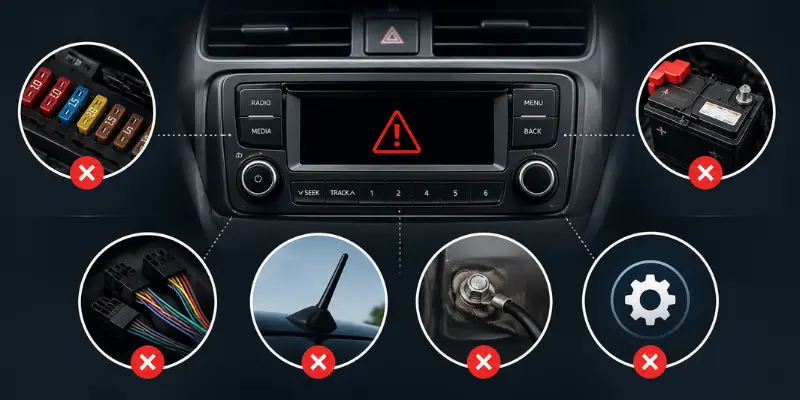
Disconnecting the battery without knowing your radio’s anti-theft code
This locks an otherwise healthy radio and can require a dealer visit to unlock.
Using a higher-amp fuse to “stop it from blowing.”
This bypasses a safety feature and risks melting wiring or starting a fire.
Forcing dash trim off with metal tools
This cracks plastic clips that are often more expensive to replace than the original radio problem.
Ignoring a fuse that blows repeatedly
That’s a short circuit, not a fuse problem. Replacing fuses without finding the short can damage the wiring harness further.
Skipping the airbag warning
On many vehicles, the radio sits on the same circuit or wiring run as airbag sensors. If you’re not confident working near that wiring, this is a sign to call a professional rather than risk disabling a safety system.
Repair vs. Replace: How to Decide
This is the question every guide skips, and it’s the one that actually saves you money.
| Factor | Lean Toward Repair | Lean Toward Replace |
|---|---|---|
| Radio is the factory unit with built-in safety/CAN bus integration | Yes, repair to keep integration intact | — |
| Issue is a known, isolated fault (capacitor, fuse, connector) | Yes, inexpensive and fast | — |
| Repair cost exceeds 50 percent of a comparable used or aftermarket unit | — | Yes, replace |
| You want modern features (Apple CarPlay, Android Auto) | — | Yes, replace with aftermarket unit |
| Radio is out of production or rare, making replacement hard to source | Yes, repair the original board | — |
As a rule of thumb, the cost to fix a non-working car radio typically falls into one of three ranges:
- $0 to $20: Fuses, antenna reconnections, and basic resets.
- $100 to $300: Professional diagnosis, wiring repair, or board-level capacitor and component repair on the original head unit.
- $400 to $1,000+: Full head unit or factory infotainment module replacement, especially on vehicles where the radio is tied into navigation, climate, and safety systems.
If your factory radio is otherwise healthy but has a specific internal fault, such as no sound, a cracked display, or a failed amplifier section, a specialized board-level repair service can often fix the original unit for a fraction of a dealer replacement cost, and you avoid losing factory integration with your steering wheel controls and backup camera.
When to Call a Professional
Some symptoms are worth handing to a pro right away rather than troubleshooting further:
- The radio is wired into airbag, navigation, or anti-theft systems and you’re not confident working around that wiring.
- A fuse blows again immediately after replacement, which signals a short you’ll need a multimeter and wiring diagram to trace.
- You’ve ruled out the fuse, antenna, and connections, but the radio still won’t power on.
- The vehicle uses a CAN bus network and multiple systems are acting up together.
- You don’t have the anti-theft code and the dealer can’t retrieve it without extensive proof of ownership.
How to Prevent Future Radio Problems
A few habits go a long way toward avoiding a repeat trip to the fuse box:
Turn the radio off before jump-starting or charging the battery
Power surges during a jump-start are a leading cause of blown radio fuses.
Write down your anti-theft code now
before you ever need it. Check the glovebox, owner’s manual sleeve, or original purchase paperwork.
Check for firmware updates every few months
the same way you’d update a phone. Many manufacturers push these over Wi-Fi or via a USB download from their support site.
Wipe the screen and vents with a microfiber cloth
regularly. Dust buildup around buttons and ports contributes to long-term connector wear.
Address a flickering or dimming display immediately
It’s often an early sign of a failing ground connection, and catching it early prevents a full power loss later.
Frequently Asked Questions
The most common reasons are a blown fuse, a loose or corroded wiring connection, or a triggered anti-theft lock following a battery disconnection. Start with the fuse box before assuming the radio itself is broken.
Hold the power button for 5 to 10 seconds for a soft reset. For a deeper reset, disconnect the negative battery terminal for 60 seconds, then reconnect. Have your anti-theft code ready, since this step can trigger the lock.
No. A blown fuse cuts power completely, so the display, sound, and backlighting will all go dark at once.
Costs range from under $20 for a fuse or antenna fix to $1,000 or more for a full infotainment replacement. Most isolated faults, like a bad capacitor or wiring issue, fall in the $100 to $300 range when repaired rather than replaced.
Yes, for fuses, antennas, loose connections, and resets. Internal faults like failed capacitors, amplifier damage, or CAN bus errors generally need a trained technician or a specialized repair service.
This is a built-in anti-theft feature designed to make a stolen radio useless. It’s not a malfunction. Enter the code from your owner’s documentation to unlock it.
Often, yes, especially if the radio is integrated with your dashboard controls, navigation, or safety systems. A board-level repair can fix the specific fault for far less than the cost of a new factory unit, while keeping all of that integration intact.
You May Also Like It:
Hyundai Elantra vs Sonata – Which Hyundai Sedan Is Better for You?
Honda Civic vs Toyota Corolla – Which One Is Better for You?
Dual Turbo vs Twin Turbo – What’s the Real Difference?



- Be Respectful
- Stay Relevant
- Stay Positive
- True Feedback
- Encourage Discussion
- Avoid Spamming
- No Fake News
- Don't Copy-Paste
- No Personal Attacks
- Be Respectful
- Stay Relevant
- Stay Positive
- True Feedback
- Encourage Discussion
- Avoid Spamming
- No Fake News
- Don't Copy-Paste
- No Personal Attacks
